When using PayKKa for payment, you can enable the option for consumers to have one or more payment data stored by PayKKa during the payment process (with consumer consent). This information can be used for quick payments or recurring payments; this greatly improves payment efficiency and success rate, reduces the complexity of consumer payments, enhances the payment experience, and facilitates subscription payments.
We refer to this saved payment data as a token, the process of storing payment data during the payment process as tokenization, and use token to identify them.
We support tokenization for multiple payment methods, including cards/ApplePay/GooglePay/SEPA direct debit, etc.
- Allows consumers to store their payment details, improving the payment experience
- In recurring payment scenarios, enables convenient subsequent automatic subscription payments
- Reduces payment failure rate, increases payment success rate
- Reduces your PCI-DSS compliance costs, improves security, and reduces the risk of payment card data leakage
To use network tokens issued by card schemes (such as Visa and Mastercard) for payment, please refer to Network Token.
When a cardholder agrees to bind a card during the first payment, subsequent payments can be made directly using the token corresponding to the bound card.
Payment process:
- When the merchant initiates a transaction for the first time, the consumer agrees to store the payment data as a token, and the payment data is stored by PayKKa as a token (the
tokencan be obtained via the transaction query interface). - When the merchant initiates a subsequent transaction, the token identifier (
token) can be used for direct debits without requiring the payment information to be entered again for authorization. - For subsequent recurring payments, since they are initiated by the merchant,
mit=trueneeds to be set, indicating that the transaction is initiated by the merchant.
- Initiate API payment, with the parameter requiring to store the payment method (
store_payment_method=true).
Request Example Initiate Transaction
{
  "merchant_id": "18356675194960",
  "payment_type": "PURCHASE",
  "trans_id": "m826xxx66465",
  "expire_time": "2025-05-05T17:17:24+08:00",
  "session_mode": "HOSTED",
  "currency": "HKD",
  "amount": "800",
  "return_url": "https://url",
  "payment": {
    "store_payment_method": true,
    "token_usage": "CARD_ON_FILE",
    "shopper_reference": "854f5baaf0a735139c583c4cea14d14c"
  },
  "mit": false  # force param
}- After successful payment, the payment data is stored by PayKKa as a token (the
tokencan be obtained via the transaction query interface).
Response Example Query Payment
{
  "ret_code": "000000",
  "ret_msg": "Success",
  "data": {
    "error_code": "0000",
    "error_description": "request success",
    "merchant_id": "18356675194960",
    "trans_id": "m826xxx66465",
    "order_id": "GW206xxx28702",
    "status": "SUCCESS",
    "authorisation_type": "FINAL_AUTH",
    "capture_method": "AUTOMATIC",
    "amount": 8715,
    "currency": "EUR",
    "pay_finish_time": "2025-05-08T15:34:14+08:00",
    "token": "TK20535xxxx8947",
    "shopper_reference": "f4911bc8b17106a08f2f7a89a9fc4d11",
    "payment": {
      "payment_method": "BANKCARD"
    },
    "card_info": {
      "bin": "400000",
      "last4": "3220",
      "card_brand": "VISA"
    },
    "balances": {
      "authed_amount": 8715,
      "captured_amount": 8715,
      "able_to_capture_amount": 0,
      "voided_amount": 0,
      "able_to_void_amount": 0,
      "refunded_amount": 0,
      "able_to_refund_amount": 8715
    }
  }
}- When initiating API payment again, the token identifier (
token) can be used for direct debits without requiring consumer authorization again.
Request Example Initiate Transaction
{
  "merchant_id": "18356675194960",
  "payment_type": "PURCHASE",
  "payment": {
    "payment_method": "BANKCARD",
    "shopper_reference": "854f5baaf0a735139c583c4cea14d14c",
    "token": "TK20535xxxx8947"
  },
  "mit": false  # force param
}- Create a checkout, with the parameter requiring to store the payment method (
store_payment_method=true).
Request Example Create Session
{
  "merchant_id": "18356675194960",
  "payment_type": "PURCHASE",
  "trans_id": "m826xxx66465",
  "expire_time": "2025-05-05T17:17:24+08:00",
  "session_mode": "HOSTED",
  "currency": "HKD",
  "amount": "800",
  "return_url": "https://url",
  "payment": {
    "store_payment_method": true,
    "token_usage": "CARD_ON_FILE",
    "shopper_reference": "854f5baaf0a735139c583c4cea14d14c"
  }
}- When the consumer pays, select quick payment and agree to store the payment method (tokenization is performed only if the consumer checks the consent box).
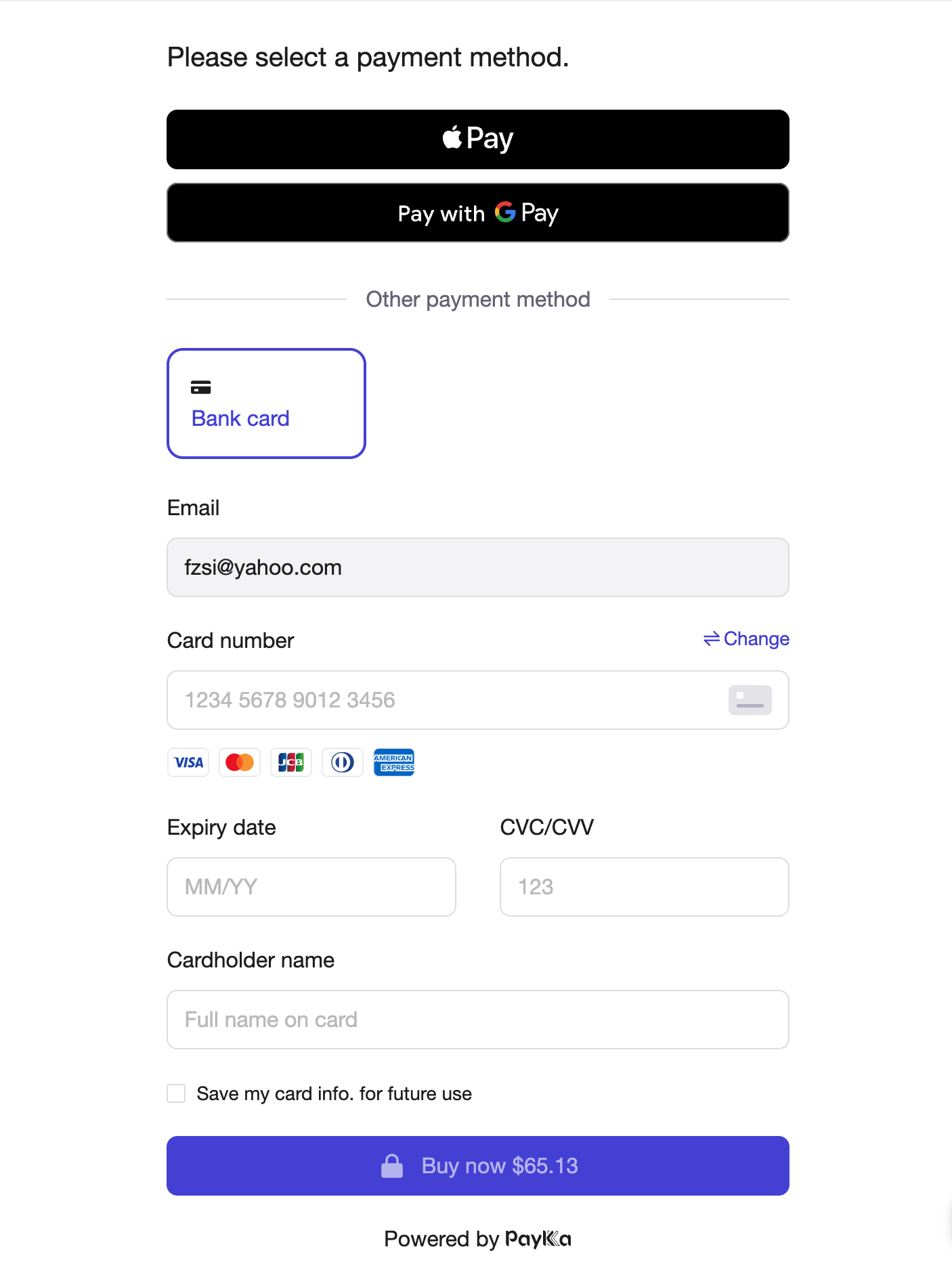
- After successful payment, if the consumer has agreed, the payment data is stored by PayKKa as a token (the
tokencan be obtained via the transaction query interface).
Response Example Query Payment
{
  "ret_code": "000000",
  "ret_msg": "Success",
  "data": {
    "error_code": "0000",
    "error_description": "request success",
    "merchant_id": "18356675194960",
    "trans_id": "m826xxx66465",
    "order_id": "GW206xxx28702",
    "status": "SUCCESS",
    "authorisation_type": "FINAL_AUTH",
    "capture_method": "AUTOMATIC",
    "amount": 8715,
    "currency": "EUR",
    "pay_finish_time": "2025-05-08T15:34:14+08:00",
    "token": "TK20535xxxx8947",
    "shopper_reference": "f4911bc8b17106a08f2f7a89a9fc4d11",
    "expire_time": "2025-05-08T19:24:49+08:00",
    "session_id": "CS206304436949400769",
    "payment": {
      "payment_method": "BANKCARD"
    },
    "card_info": {
      "bin": "400000",
      "last4": "3220",
      "card_brand": "VISA"
    },
    "balances": {
      "authed_amount": 8715,
      "captured_amount": 8715,
      "able_to_capture_amount": 0,
      "voided_amount": 0,
      "able_to_void_amount": 0,
      "refunded_amount": 0,
      "able_to_refund_amount": 8715
    }
  }
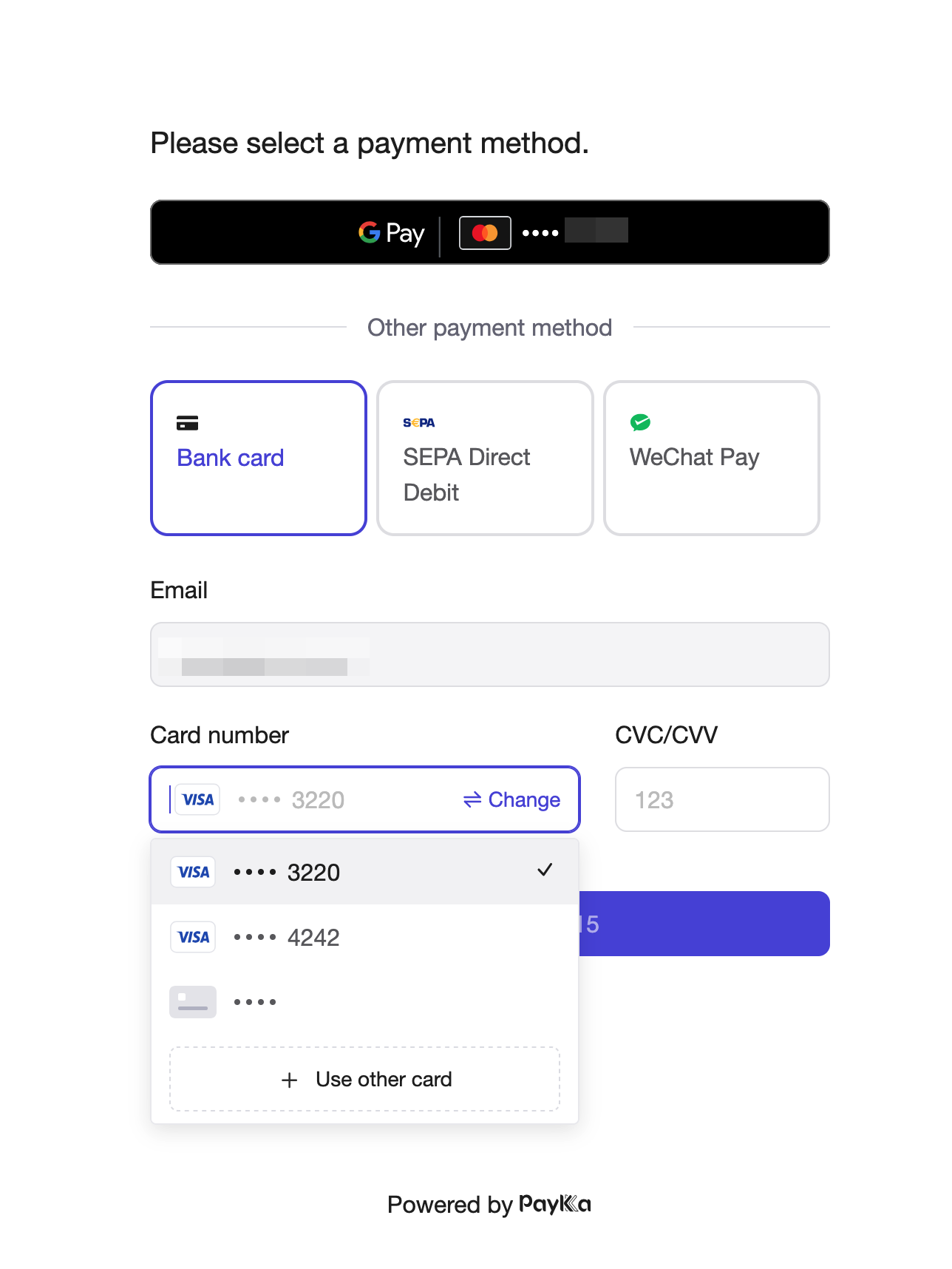
}- When creating a checkout for payment again, you can select quick payment and choose the stored token, enter CVV to pay directly.
Request Example Create Session
{
  "merchant_id": "18356675194960",
  "payment_type": "PURCHASE",
  "trans_id": "m826xxx66465",
  "expire_time": "2025-05-05T17:17:24+08:00",
  "session_mode": "HOSTED",
  "currency": "USD",
  "amount": "100",
  "return_url": "https://url",
  "payment": {
    "payment_method": "BANKCARD",
    "shopper_reference": "854f5baaf0a735139c583c4cea14d14c",
    "token": "TK20535xxxx8947"
  }
}
Field: token_usage
Currently, PayKKa supports the following token usages:
- CARD_ON_FILE: Consumer-present payment (mainly for quick payment in consumer payment scenarios).
- SUBSCRIPTION: Subscription (for recurring payments in subscription scenarios, including API and checkout).
To delete a token, use the Delete Token interface, providing token and shopper_reference
Deleting a token is irreversible. Please proceed with caution.
To query the token list, use the Query Token List interface, providing shopper_reference