The embedded checkout supports embedding PayKKa's checkout payment component into your mobile application interface to collect consumer payment information.
You can create your own checkout flow through the PayKKa APP SDK. The payment information entered by consumers is only transmitted within the component, which can reduce your PCI-DSS compliance costs.
- Visa
- MasterCard
- JCB
- American Express
- Discover
- Diners Club
- Apple Pay
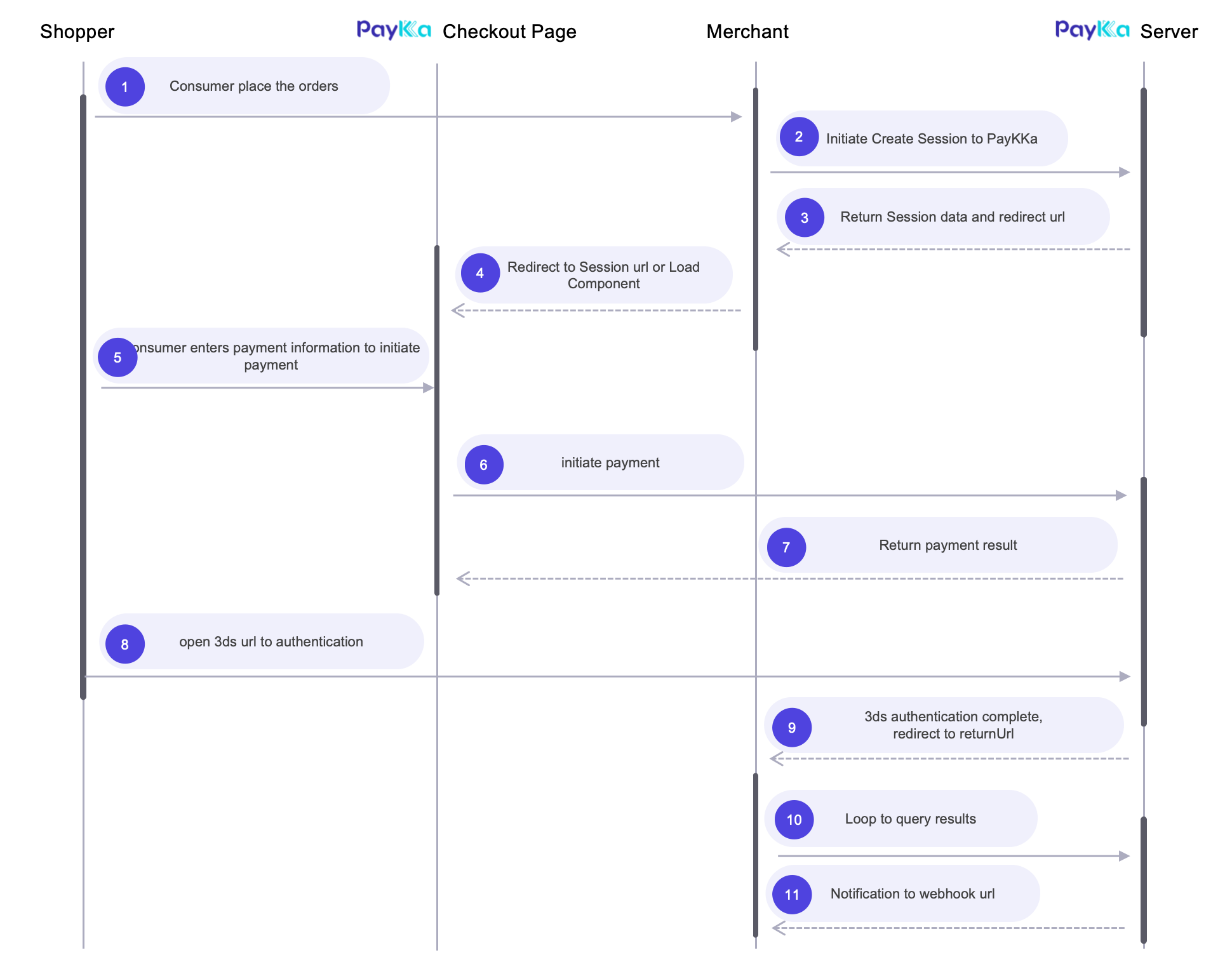
- Customers access the checkout interface in your mobile application, enter customer shipping and billing information, and click the payment button
- You initiate a payment request from the server to create a checkout, and you will receive the checkout ID(session_id) for loading the checkout later
- You use the checkout ID(
session_id) and Client key(client_key) to load the embedded checkout component within the application interface - The embedded checkout component will dynamically display supported payment methods. After the customer selects a payment method, click the payment button
- After submitting the payment, we will process all possible additional operations, such as 3DS authentication or third-party redirect pages
- After the payment is processed, the component callback function will be triggered, and you can handle the payment result here
- Your webhook address will receive the payment result notification (it is recommended that you integrate transaction query to get the payment result)
- Get your transaction key
- Get your Client key
- Prepare your notification webhook address, provide it in the request parameters or set in the background, and notifications will be sent to the merchant at key payment nodes
- Prepare your redirect address, provide it in the request parameters, and it will redirect after checkout payment is completed
- Initiate the request: Create Session interface to create checkout, return checkout ID
- For mobile component integration method, see iOS SDK
- Merchants can integrate the Query Session interface to get checkout results, or directly integrate the Query Transaction interface to get order results (if there is no final result, it means the consumer has not initiated a transaction)
PayKKa's checkout (identifier: session_id) represents a payment intention in the form of a page. The final payment result is determined by the transaction (identifier: order_id) result. Therefore, you need to pay attention to the final status of the order to determine the payment result.
Checkout query: Used to query the status and payment result of the checkout. If the consumer has not initiated payment, no transaction order will be generated.
Transaction query: Used to query the payment result of a transaction order. After the order reaches its final state, it will be notified via webhook.
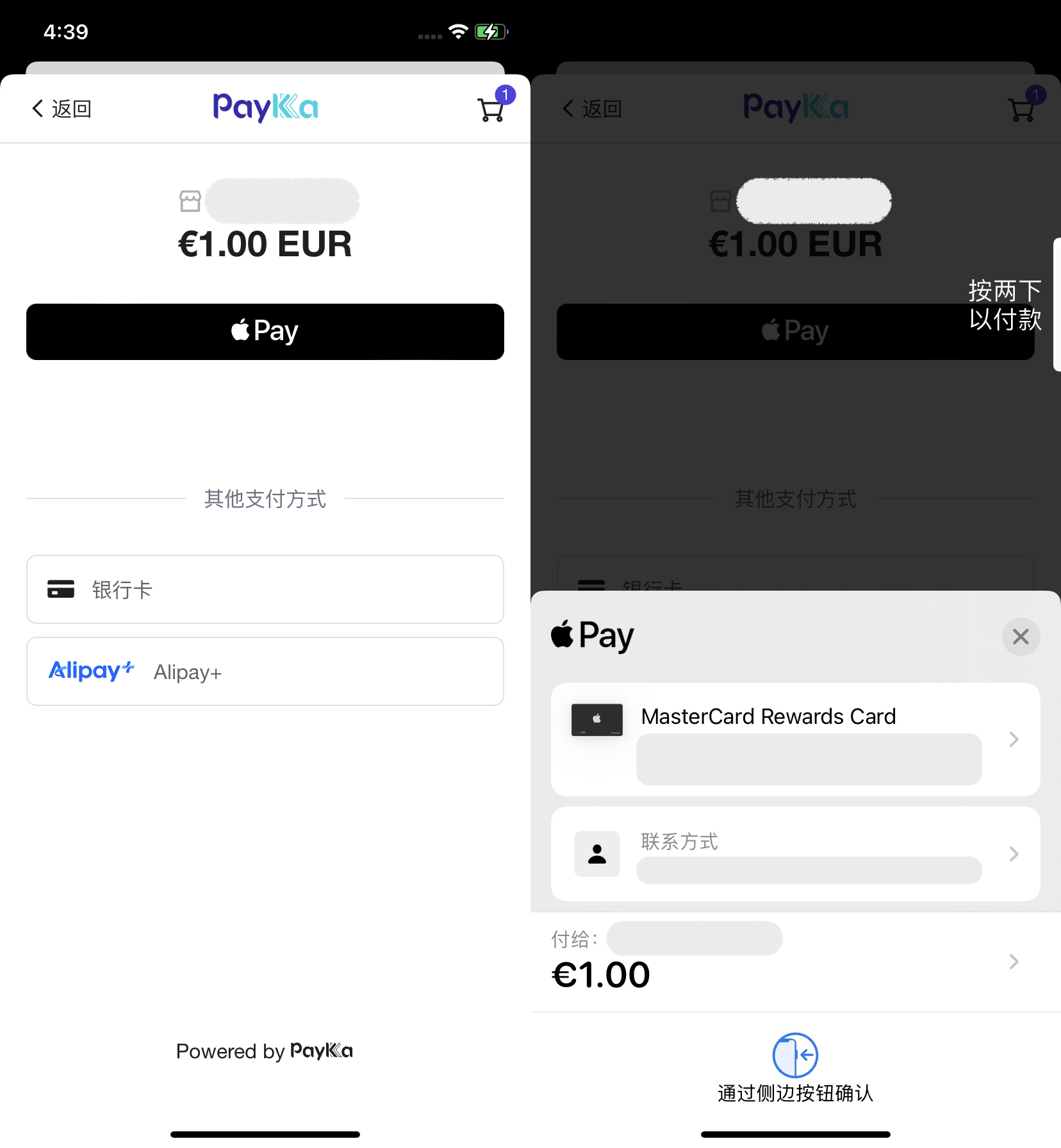
Default component style
When the customer is ready to pay, send a server request to create a Session and corresponding link, and initiate a payment request through the Session.
Request example Create Session
{
  "merchant_id": "18356675194960",
  "payment_type": "PURCHASE",
  "authorisation_type": "FINAL_AUTH",
  "capture_method": "AUTOMATIC",
  "trans_id": "m3246749195217",
  "expire_time": "2025-05-05T17:17:24+08:00",
  "session_mode": "DROP_IN",  # Checkout mode, DROP_IN: embedded, COMPONENT: component
  "display_locale": "fr-FR",
  "currency": "HKD",
  "amount": "800",
  "return_url": "https://url",
  "payment": {
    "store_payment_method": true,  # Whether to store card information and tokenize, will get token; true: store, false: do not store
    "token_usage": "CARD_ON_FILE"
    "shopper_reference": "854f5baaf0a735139c583c4cea14d14c"
  },
  "goods": [
    // Product information
  ],
  "bill": {
    // Billing information
  },
  "shipping": {
    // Shipping information, required for physical trade
  },
  "customer": {
    // Consumer/customer information
  }
}
Response example
{
	"ret_code": "000000",
	"ret_msg": "Success",
	"data": {
		"merchant_id": "18356675194960",
		"trans_id": "m3246749195217",
		"session_id": "CS208760010022288125",
		"session_mode": "DROP_IN",
		"status": "PROCESSING",
		"currency": "HKD",
        "amount": "800",
		"expire_time": "2025-05-05T17:17:24+08:00",
		"authorisation_type": "FINAL_AUTH",
		"capture_method": "AUTOMATIC"
	}
}See iOS SDK
Query checkout status by checkout ID(session_id)
Request example Query Session
{
  "merchant_id": "18356675194960",
  "trans_id": "m3246749195217",  # Choose one of trans_id/session_id
  "session_id": "CS208760010022288125"
}
Response example
{
  "ret_code": "000000",
  "ret_msg": "Success",
  "data": {
    "merchant_id": "18356675194960",
    "trans_id": "m3246749195217",
    "session_id": "CS208760010022288125",
    "session_mode": "DROP_IN",
    "status": "PROCESSING",
    "amount": "800",
    "currency": "HKD",
    "expire_time": "2025-05-05T17:17:24+08:00",
    "authorisation_type": "FINAL_AUTH",
    "capture_method": "AUTOMATIC"
  }
}Query transaction status by transaction ID(order_id)
Request example Query Transaction
{
  "merchant_id": "18356675194960",
  "trans_id": "m3246749195217",    # Choose one of session_id/order_id/trans_id
  "session_id": "CS208760010022288125",
  "order_id": "GW208760010022288125"
}
Response example
{
  "ret_code": "000000",
  "ret_msg": "Success",
  "data": {
    "merchant_id": "18356675194960",
    "trans_id": "m3246749195217",
    "order_id": "GW208760010022288125",
    "session_id": "CS208760010022288125",
    "status": "SUCCESS", # Transaction status
    "error_code": "0000", # Transaction error code
    "error_description": "request success",
    "amount": "800",
    "currency": "HKD",
    "pay_finish_time": "2025-05-05T17:17:24+08:00"
  }
}If your payment requires repeated deductions from the customer's bank card or e-wallet at certain intervals (such as monthly, yearly, or custom time intervals) without requiring the customer to manually authorize each time, you can use PayKKa's recurring payment feature.
- Currently, PayKKa's supported recurring payments need to be initiated regularly by the merchant
- For the first recurring payment, PayKKa needs to store the cardholder's card information. For subsequent recurring payments, only the cardholder's token needs to be provided
- For subsequent recurring payments, only the cardholder's token needs to be provided, and card information does not need to be provided again
First recurring request example Create Session
{
  "merchant_id": "18356675194960",
  "payment_type": "RECURRING",
  "authorisation_type": "FINAL_AUTH",
  "capture_method": "AUTOMATIC",
  "trans_id": "m3246749195217",
  "expire_time": "2025-05-05T17:17:24+08:00",
  "session_mode": "COMPONENT",
  "display_locale": "fr-FR",
  "currency": "HKD",
  "amount": "800",
  "return_url": "https://url",
  "mit": false,
  "payment": {
    "store_payment_method": true,
    "token_usage": "SUBSCRIPTION",
    "shopper_reference": "854f5baaf0a735139c583c4cea14d14c"
  },
  "goods": [
    // Product information
  ],
  "bill": {
    // Billing information
  },
  "shipping": {
    // Shipping information, required for physical trade
  },
  "customer": {
    // Consumer/customer information
  }
}
Subsequent recurring request example Initiate Transaction
{
  "merchant_id": "18356675194960",
  "payment_type": "RECURRING",
  "authorisation_type": "FINAL_AUTH",
  "capture_method": "AUTOMATIC",
  "trans_id": "m3246749195217",
  "currency": "HKD",
  "amount": "800",
  "mit": true,
  "recurring_agreement_id": "RA4264524535435435",
  "payment": {
    "payment_method": "BANKCARD",
    "shopper_reference": "558b5cb1b8cbcc8496062155c69cf2ab",
    "token": "TK20231435132143229"
  }
}The checkout product does not require you to handle 3DS authentication. PayKKa will automatically and intelligently detect and process payment security. You only need to focus on the payment result.
The checkout expiration time is up to 24 hours. After expiration, payment cannot continue. The Drop-in component will receive the callback event onExpired. You can prompt the user that the payment has expired in this event and guide the user to re-initiate the payment.
If payment is not initiated after expiration, there will be no notification. Querying the checkout status will get status=EXPIRED, and querying the transaction status will get ret_msg=the order doesn't exist
Refer to Webhook