API Only mode refers to merchants building their own payment flow and pages by calling PayKKa's API interfaces through their frontend and backend. Payment requests and responses are handled through API interactions, with the following characteristics:
- Highly customizable
- High development cost
For card payments, we accept two API solutions:
- Use the card information encryption component Encrypted Card to securely encrypt card information. This helps you comply with PCI requirements.
- Directly collect and transmit raw card data in plain text. This method requires you to have PCI DSS certification. If you wish to use this mode, please contact your account manager to provide PCI certification.
To integrate Encrypted Card, you need to provide your domain name to remove cross-origin restrictions.
- Visa
- MasterCard
- JCB
- American Express
- Discover
- Diners Club
- Apple Pay
- Google Pay
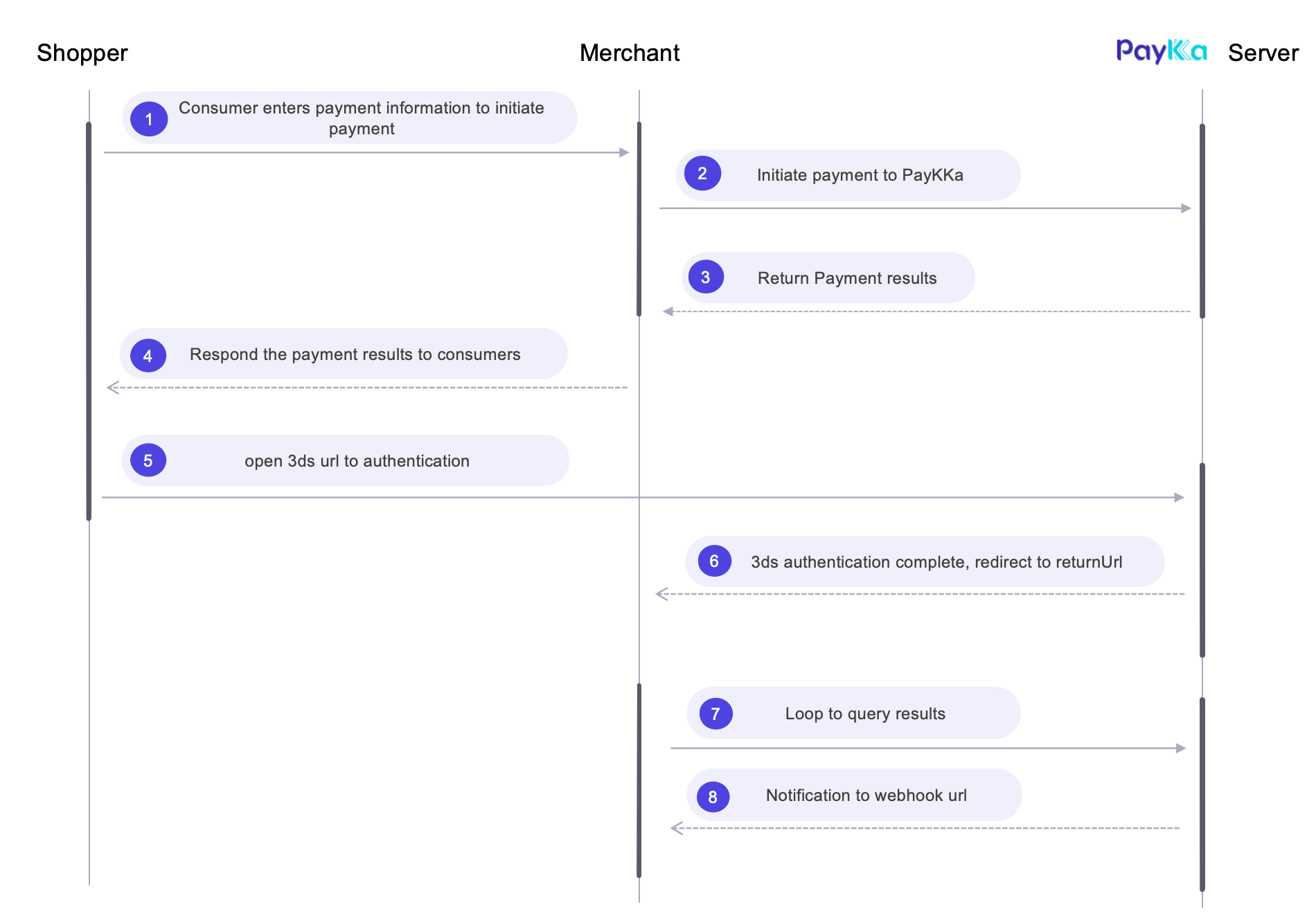
- Get your transaction key
- Get your Client key (required for Encrypted Card integration).
- Prepare your notification webhook address, provide it in the request parameters or set in the background, and notifications will be sent to the merchant at key payment nodes.
- Prepare your redirect address, provide it in the request parameters, and it will redirect after 3DS authentication is triggered.
- Initiate the request.
- Whether 3DS authentication is required for the consumer can be determined by the response field
authentication_result.authentication_urlfrom the payment or query interface. If returned, it indicates that the consumer is waiting to complete 3DS authentication.
API: Initiate Transaction
{
  "merchant_id": "18356675194960",
  "payment_type": "PURCHASE",
  "authorisation_type": "FINAL_AUTH",
  "capture_method": "AUTOMATIC",
  "trans_id": "m1721xxx938999",
  "currency": "USD",
  "amount": "300",
  "return_url": "https://url",
  "payment": {
    "payment_method": "BANKCARD",
    "shopper_reference": "myuserid001",
    "card_no": "4242424242424242",
    "exp_year": "2031",
    "exp_month": "07",
    "cvv": "123",
    "holder_name": "lisa"
  },
  "authentication": {
    "challenge_indicator": "AUTO"
  },
  "browser": {
    // Consumer terminal information
  },
  "goods": [
    // Product information
  ],
  "bill": {
    // Billing information
  },
  "shipping": {
    // Shipping information, required for physical goods
  },
  "customer": {
    // Consumer/customer information
  }
}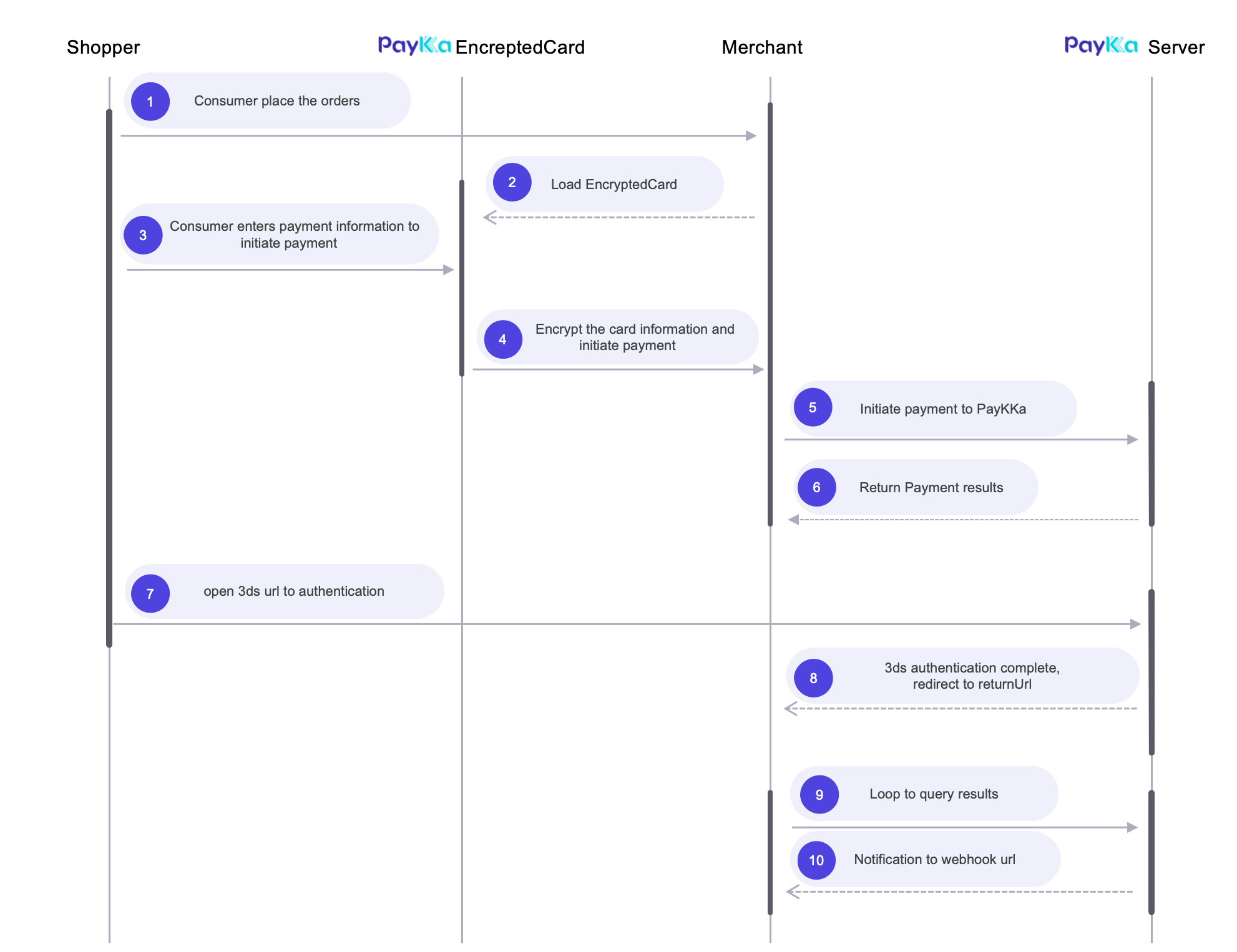
- Get your transaction key
- Get your Client key (required for Encrypted Card integration).
- Prepare your notification webhook address, provide it in the request parameters, and notifications will be sent to the merchant at key payment nodes.
- Prepare your redirect address, provide it in the request parameters, and it will redirect after 3DS authentication is triggered.
- Initiate the request.
- Whether 3DS authentication is required for the consumer can be determined by the response field
authentication_result.authentication_urlfrom the payment or query interface. If returned, it indicates that the consumer is waiting to complete 3DS authentication. - For component integration process, see Encrypted Card.
API: Initiate Transaction
{
    ...
    "payment": {
        "payment_method": "BANKCARD",
        "shopper_reference": "myuserid001",
        "encrypted_card_no": "MTc0MjczNjg1Nxxxx",
        "encrypted_exp_year": "Wt938LfJ2Pxxxxx",
        "encrypted_exp_month": "WfRto3qWfidnxxx",
        "encrypted_cvv": "MEal81oshxxx",
        "holder_name": "lisa"
    },
    ...
}Case 1: Merchant decrypts card information
{
    ...
    "payment": {
        "payment_method": "APPLE_PAY",
        "shopper_reference": "myuserid001",
        "card_no": "4242424242424242",
        "exp_year": "2031",
        "exp_month": "07",
        "cvv": "123",
        "holder_name": "lisa",
        "token_authentication": {
          "cryptogram": "ALbOGff2RLbTADtP3BuIAoABFA==",
          "token_format": "cryptogram_3ds",
          "eci": "07"
        }
    }
    ...
}
Case 2: Merchant does not decrypt card information
{
    ...
    "payment": {
        "payment_method": "APPLE_PAY",
        "shopper_reference": "myuserid001",
        "token_data": "token from ApplePay SDK"
    },
    ...
}- ApplePay currently supports two integration methods: 1. If the merchant integrates ApplePay and decrypts card information, they can send plain text card information to PayKKa; 2. If the merchant does not decrypt, they need to integrate the Create Apple Pay Session interface to load the ApplePay component, and finally send the payment token (JSON string) generated by the ApplePay component to PayKKa for decryption and transaction.
- For detailed ApplePay integration process, see ApplePay.
Case 1: Merchant decrypts card information
{
    ...
    "payment": {
        "payment_method": "GOOGLE_PAY",
        "shopper_reference": "myuserid001",
        "card_no": "4242424242424242",
        "exp_year": "2031",
        "exp_month": "07",
        "cvv": "123",
        "holder_name": "lisa",
        "token_authentication": {
          "cryptogram": "ALbOGff2RLbTADtP3BuIAoABFA==",
          "token_format": "CRYPTOGRAM_3DS",
          "eci": "02",
          "account_verified": true,
          "card_holder_authenticated": true
        }
    }
    ...
}
Case 2: Merchant does not decrypt card information
{
    ...
    "payment": {
        "payment_method": "GOOGLE_PAY",
        "shopper_reference": "myuserid001",
        "token_data": "token from GooglePay SDK"
    },
    ...
}- GooglePay currently supports two integration methods: 1. If the merchant integrates GooglePay and decrypts card information, they can send plain text card information to PayKKa; 2. If the merchant does not decrypt, they can send the payment token (JSON string) generated by the GooglePay component to PayKKa for decryption and transaction.
- For detailed GooglePay integration process, see GooglePay.
3DS verification provides intelligent security protection for online credit and debit card transactions, ensuring transaction security through real-time identity verification. During the payment process, the system guides cardholders to complete security authentication with their issuing bank, thereby enhancing transaction security while transferring potential fraud risk liability to the issuing institution, providing merchants with more reliable payment protection.
- Request: You can specify 3DS verification preference through the API parameter
authentication, but subsequent verification processing is determined by the card scheme and issuing bank. - Response: Parse PayKKa's API response and redirect to the 3DS verification URL, then let PayKKa handle the subsequent 3DS verification process.
3DS verification results will be notified to the merchant through PayKKa's webhook, and the merchant can process accordingly based on the notification results;
Request Example
{
    ...
    "authentication": {
        "challenge_indicator": "AUTO"
    },
    ...
}
Response Example
{
    "ret_code": "000000",
    "ret_msg": "Success",
    "data": {
        ...
        "status": "PROCESSING",
        "authentication_result": {
            "authentication_url": "https://3ds_path_url"
        },
        "payment": {
            "payment_method": "BANKCARD"
        },
        ...
    }
}If your payment requirements involve recurring charges from customers' bank cards or e-wallets at regular intervals (such as monthly, yearly, or custom time intervals) without requiring manual authorization each time, you can use PayKKa's recurring payment feature.
- Currently, PayKKa's recurring payment feature requires the merchant to initiate it periodically
- For the first recurring payment, PayKKa needs to store the card information of the cardholder, and subsequent recurring payments only need to provide the cardholder's token
- For subsequent recurring payments, only the cardholder's token needs to be provided, without repeating card information
First recurring request example Initiate Transaction
{
  "merchant_id": "18356675194960",
  "payment_type": "RECURRING",
  "authorisation_type": "FINAL_AUTH",
  "capture_method": "AUTOMATIC",
  "trans_id": "m3246749195217",
  "currency": "HKD",
  "amount": "800",
  "return_url": "https://url",
  "mit": false,
  "payment": {
    "payment_method": "BANKCARD",
    "store_payment_method": true,
    "token_usage": "SUBSCRIPTION",
    "shopper_reference": "854f5baaf0a735139c583c4cea14d14c",
    "exp_year": "2029",
    "exp_month": "08",
    "cvv": "579",
    "holder_name": "Yi Westrich",
    "card_no": "5555555555554444"
  },
  "browser": {
    // Consumer terminal information
  },
  "goods": [
    // Product information
  ],
  "bill": {
    // Billing information
  },
  "shipping": {
    // Shipping information, required for physical goods
  },
  "customer": {
    // Consumer/customer information
  }
}
Subsequent recurring request example Initiate Transaction
{
  "merchant_id": "18356675194960",
  "payment_type": "RECURRING",
  "authorisation_type": "FINAL_AUTH",
  "capture_method": "AUTOMATIC",
  "trans_id": "m3246749195217",
  "currency": "HKD",
  "amount": "800",
  "mit": true,
  "recurring_agreement_id": "RA4264524535435435",
  "payment": {
    "payment_method": "BANKCARD",
    "shopper_reference": "558b5cb1b8cbcc8496062155c69cf2ab",
    "token": "TK20231435132143229"
  }
}
Fraud Detection is a JavaScript code embedded in a website or payment page, used to collect user behavior data, device information, and transaction environment in real-time, helping payment systems or risk control platforms identify potential fraudulent transactions
Integration Method PayKKa Fraud Detection
It is strongly recommended to integrate PayKKa's Fraud Detection SDK, which can significantly reduce fraud and rejection risk, and improve payment success rate
Reference Webhook